Your event's showcase website is often the first interaction with your future attendees. It reflects the first contact between your event and your attendees and shows the professionalism of the event to come.
However, creating an effective event website isn't always simple. Between designing the layout, presenting the agenda, managing registrations, and optimizing your event's visibility, many elements need to be considered to offer visitors a smooth experience and maximize your attendance rate.
Discover the best practices here.
What are the benefits of an event website?
Your event website is similar in purpose to a landing page, since the goal is the same: provide information, offer relevant content, generate interest, and drive registrations.
When well designed, it becomes a real communication and management tool for you, the organizer.
Its main benefits are:
- Centralize key information : agenda, speakers, venue, access, or partners are brought together on a single platform.
- Facilitate online registration: attendees can sign up quickly via a form or an integrated ticketing system.
- Improve your event's visibility: a well-optimized event website can attract new attendees through search engines.
- Showcase your event's image : a dedicated website strengthens your credibility and gives a professional first impression.
- Highlight your agenda and speakers: you can clearly present the content and benefits of your event.
- Simplify attendee management: registration tracking, confirmations, and communications can all be centralized.
- Support your communications : the website becomes the entry point that your email campaigns, social media, or invitations can link back to.
In short, a well-designed website will boost your registration, attendance, and engagement figures, based on our own experience. Your events will have a greater impact right from the registration phase.
7 best practices for creating the perfect event website
Even as an event organizer, you should draw on UX design techniques and online marketing to optimize the user experience. Event management is an integral part of a communication strategy and should therefore borrow some of its conventions.
Here are the best practices for designing (with ease) a flawless event website:
Use a visual identity
A classic of communication design. One of the first things an attendee will notice when they land on your event website is its colors and overall consistency.
Identify the colors and fonts you want to use across all your communication channels: these will guide your visual identity. Once this identity is set, stick to it.
We recommend using no more than 5 colors in total on your website. Defining this visual identity as early as possible, before creating your site, is crucial to avoid wasting time later on.
It's essential to keep the size of headings, paragraphs, margins, borders, and spacing consistent across all your pages and elements. Always use the same button styles to ensure a harmonious result. In short, the key word for your website's design: consistency.
Also make sure not to illustrate your website with graphic elements from different styles (some icons in flat design and others in 3D, for example), to avoid creating a visual inconsistency.
To define this, if it isn't already set in your company's brand guidelines, there are many free tools available, such as:
- The palette explorer, which gives you harmonious tones
- The Adobe Color Wheel tool
- The Google Font catalog, to select your fonts
Using Digitevent as your event website builder? Head to your event's visual identity settings so your brand guidelines apply automatically to every page you create afterward.
Think about the user journey
When creating an event website, it's essential to anticipate your attendees' journey through your site. Focus on the concrete benefits of your event: what people will learn there, and what it's for.
Of course, mention the essentials (where, when, how to get there) as well as a brief overview of the event's topic.
Constantly ask yourself which information is most important to show, and how to build harmony between all these elements and pieces of information, taking care not to overload your pages.
Anticipate your attendees' journey: are your call-to-action buttons clearly visible and prominently placed?
Use page structures designed for conversion
Certain page structures, including the so-called F-pattern and Z-pattern, are among the best ways to drive conversions on a web page:
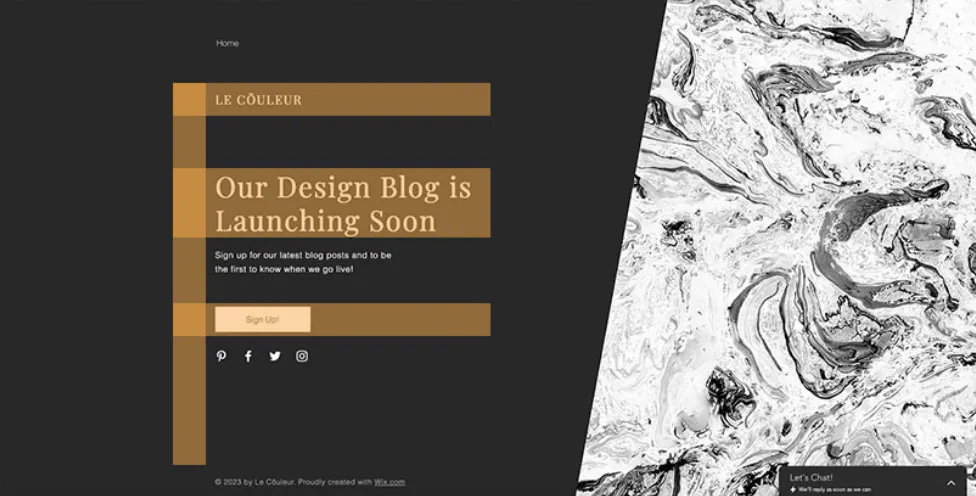
Example of an F-pattern page, photo credit: Wix
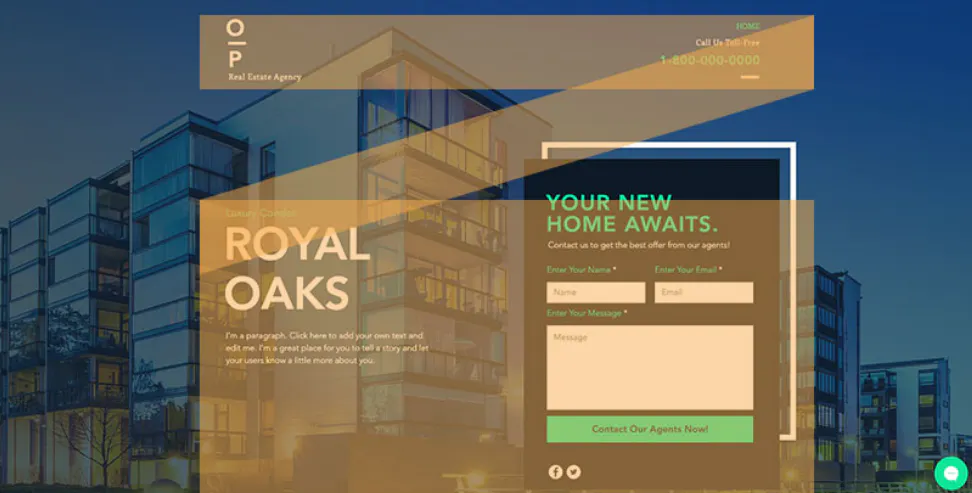
Example of a Z-pattern page, photo credit: Wix
These structures help your attendees focus on your website's goal: registering for your event.
At Digitevent, we've built these types of structures directly into our event website design tool. In just a few clicks, you can add modular, polished blocks to each page to easily design your website.
Illustrate your website
The power of images no longer needs proving. This is also true for website design: a site with images and illustrations will be far more engaging than one that contains only text.
So illustrate your text with quality images that are consistent with one another. Watch out for copyright: either use your own visuals, or choose from royalty-free image libraries.
Digitevent's extra touch? The platform natively includes access to Unsplash, a free image library. What's more, there's no image size restriction: your photos are automatically adapted to your attendees' screen size.
Think about search engine optimization (SEO)
Thinking about SEO from the moment you create your event website can greatly improve your event's visibility. By optimizing certain pages for relevant keywords (such as the event's name, theme, or location), you increase your chances of appearing in search results when potential attendees search for this type of event.
Good SEO relies in particular on:
- A clear page structure
- Well-organized headings
- Descriptive content
- The natural inclusion of keywords related to your event
Essential information such as the agenda, speakers, or registration details should also be easily accessible and well structured so search engines can interpret it correctly.
Finally, SEO can also help extend your event's visibility over time. A well-optimized event website can keep generating traffic before, during, and even after the event, while strengthening your brand's or organization's reputation.
To go further, discover our tips for boosting your website's visibility with SEO.
Have the guarantee of a secure, GDPR-compliant website
Of course, your website will collect information about your attendees. You can link it to a Google Analytics account, which means placing cookies on your visitors' computers.
To remain GDPR-compliant, you must obtain consent and detail your privacy policy.
Also check that your website is secure and uses HTTPS.
With Digitevent, these security and compliance requirements are built directly into the platform. Our solution is notably ISO 27001 certified, the leading international standard for information security management, which guarantees strict processes are in place to protect organizers' and attendees' data.
What's more, all exchanges are secured via HTTPS/SSL, passwords are encrypted, and data is hosted on secure infrastructure located in the European Union. Finally, Digitevent applies strict access management and internal protection rules to ensure the confidentiality and integrity of the data collected during your events.
Test and retest everything
Finally, it's essential to thoroughly test your website, as if you were a visitor. To do this, ask five colleagues to visit your event website, ideally using five different devices and browsers. Don't say anything throughout the test, and listen to every comment, noting each difficulty your colleagues encounter.
This step is crucial so you can then send your registration invitations with total peace of mind.
What tools can you use to create an event website?
Several solutions exist for creating a website dedicated to your event. The choice generally depends on your technical skill level, your event management needs, and the level of customization you want for your event website. Some solutions are designed for building standard websites, while others are built specifically for organizing events and managing attendees.
Standard CMS platforms
CMS (Content Management System) platforms are popular solutions for building websites. They let you design fully customized websites, often with a site editor and numerous plugins.
Examples include WordPress, Webflow, or Wix.
Advantages:
- Great customization flexibility to design a personalized event website or a bespoke site tailored to your brand image.
- A large ecosystem of plugins and integrations to add features like online ticketing, ticket sales, email sending, or forms to manage registrations.
Drawbacks:
- More technical setup - building a website can be complex without development skills or the help of a web agency.
- Event website features (ticketing, access control, attendee engagement) often rely on several plugins that need to be installed and configured.
- Regular maintenance required : updates, security, hosting, domain name management, and legal aspects.
No-code tools
No-code tools let you build your website easily thanks to an intuitive interface and ready-to-use site templates. They're often used to quickly create a mini event website or a page dedicated to an event.
Examples include Tilda, Framer, or Squarespace.
Advantages:
- Creating a personalized event website without technical skills, thanks to templates or site models.
- Simple visual interface for easily designing your pages.
- Fast deployment for one-off events or event landing pages.
Drawbacks:
- Limited event features: attendee management, online ticketing, or access control often require external tools.
- Lower scalability for more complex events, such as a trade show or a cultural event.
Event platforms
Some solutions are specially designed for event management. They combine event website creation, ticketing, attendee management, and event communication tools in a single management platform.
Their main benefit? Features that are 100% dedicated to events: managing registrations, ticket sales, access control, sending emails, and real-time attendee management.
They also let you centralize your entire event organization: the event website, attendee database, communications, and reporting are all brought together in a single tool.
Used well, these platforms save organizers real time: they get a bespoke, easily customizable event website without going through a web agency or a complex website build.
If you want to create an event website quickly while benefiting from comprehensive event management tools, a specialized platform like Digitevent can save you precious time. The solution lets you easily design a personalized event website, manage registrations and online ticketing, communicate with your attendees, and control access, all from an intuitive interface designed for professional event organizers.
Want to see how to create and manage your event website with Digitevent? Request a free demo and discover how the platform can simplify the organization of your events.
V2 - 14/04/2026